
Planning a fundraiser, school fair, charity event, or business promotion? Learning how to make raffle tickets with numbers is one of the easiest ways to organize a successful raffle while keeping track of participants and winners.
The good news is that you don’t need expensive software or professional printing services. Whether you need 20 tickets or 2,000 printable raffle tickets with numbers, you can create them yourself using Microsoft Word, Excel, Canva, or free online templates.
In this complete guide, you’ll learn how to create professional-looking raffle tickets, add sequential numbering, print them at home, and manage ticket distribution efficiently.
Why Use Numbered Raffle Tickets?
Numbered raffle tickets help organizers:
- Track ticket sales easily
- Verify winning tickets quickly
- Prevent duplicate entries
- Organize fundraising events professionally
- Manage multiple raffle draws efficiently
Whether you’re organizing a school fundraiser, community event, charity raffle, or business giveaway, using a numbered raffle ticket ensures everything stays organized.
Step 1: Gather the Information for Your Raffle Ticket
Before designing your ticket, prepare all the details you want to include.
Event Name
The event name should be prominently displayed on the ticket. This helps attendees instantly identify the raffle and the organization hosting it.
Date and Time
Include:
- Event date
- Event time
- Raffle drawing date
- Winner announcement time
This information ensures participants know when the raffle takes place.
Organizer Information
Add contact details such as:
- Phone number
- Email address
- Website URL
- Event location
Participants should be able to contact the organizer if they have questions.
Ticket Number
Every raffle ticket should have a unique number.
Examples:
- 001
- 002
- 003
For tear-off tickets, print the same number on both sections. This makes winner verification much easier.
Pro Tip: Use a serial format like:
- R001
- R002
- R003
This is especially useful if you run multiple raffles throughout the year.
Ticket Price
Clearly display the ticket cost, such as:
- $1 Per Ticket
- $5 Per Ticket
- 3 Tickets for $10
This helps buyers understand pricing immediately.
Prize Information
Include information about:
- Grand prize
- Runner-up prizes
- Estimated prize value
Attractive prize details encourage more ticket sales.
Add a QR Code
If space is limited, add a QR code linking to:
- Event website
- Prize details
- Registration page
- Social media accounts
Step 2: Choose a Method to Create Raffle Tickets
There are several ways to create raffle tickets depending on your budget, skills, and event size.
Option 1: Make Raffle Tickets in Word and Excel
One of the most popular methods is using Microsoft Word and Excel.
If you’re wondering how to make raffle tickets in Word, follow these steps:
Create Ticket Numbers in Excel
- Open Microsoft Excel.
- Create a column titled “Ticket Number.”
- Enter sequential numbers such as:
- 001
- 002
- 003
- Continue until you reach your desired quantity.
- Save the Excel file.
Design the Ticket in Word
- Open Microsoft Word.
- Create a new document.
- Design your raffle ticket layout.
- Go to Mailings > Start Mail Merge.
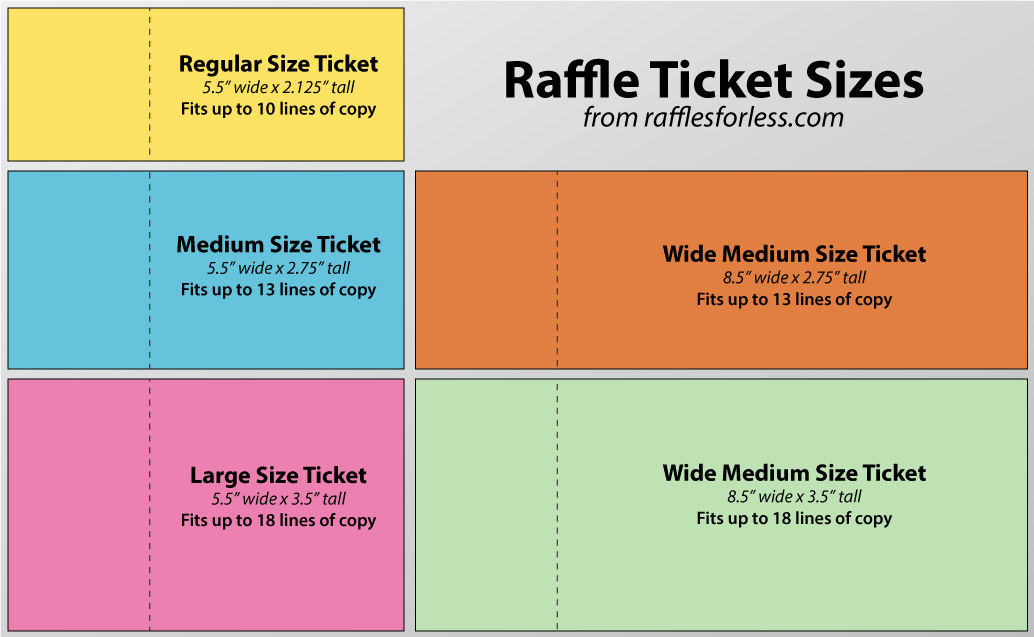
- Select Labels or create a custom ticket size.
- Click Select Recipients.
- Choose your Excel file.
- Insert the ticket number field.
- Complete the design.
Generate Numbered Tickets
- Select Finish & Merge.
- Choose Print Documents.
- Word will automatically insert unique ticket numbers.
Using a raffle ticket template file can make this process even faster.
Option 2: Use Free Online Templates
Many people prefer online tools because they are easy to use and require no design experience.
Popular platforms include:
- Canva
- Adobe Express
- Avery Design & Print
These tools provide:
- Drag-and-drop editing
- Ready-made designs
- Easy logo uploads
- Color customization
- PDF export options
You can start with a free printable raffle tickets with numbers template and customize it to match your event branding.
Benefits include:
- Professional appearance
- Faster design process
- No advanced software required
- Easy sharing and printing
Option 3: Use a Numbered Raffle Ticket Template
If you’re short on time, using a numbered raffle ticket template is often the easiest solution.
A template typically includes:
- Sequential numbering
- Tear-off stubs
- Event information sections
- Prize details
- Professional formatting
Simply edit the details and print.
Many websites also offer a raffle numbers template that automatically generates ticket sequences.
Option 4: Hand-Made Raffle Tickets
For small events or family gatherings, handmade tickets can work perfectly.
This option is ideal when creating:
- Less than 50 tickets
- Children’s game tickets
- Office raffle tickets
- School activity tickets
Simply:
- Use cardstock or index cards.
- Write event information clearly.
- Add unique numbers manually.
- Duplicate the number on the stub if needed.
While time-consuming, this method is inexpensive and effective for small-scale events.
Step 3: Design Tips for Professional Raffle Tickets
To make your tickets stand out:
Use Bold Fonts
Highlight important information such as:
- Ticket numbers
- Event name
- Prize details
Choose Eye-Catching Colors
Use colors that match your event theme and improve visibility.
Include Your Logo
Branding adds professionalism and credibility.
Leave White Space
Avoid cluttering the ticket with excessive text.
Use High-Quality Images
Images of prizes or event graphics can increase interest and ticket sales.
Step 4: Print Your Numbered Raffle Tickets
After completing your design, it’s time to print.
Best Printing Materials
Use:
- Cardstock paper
- Heavyweight paper stock
- Matte finish paper
These materials are durable and professional-looking.
Print Multiple Tickets Per Page
Most organizers print:
- 4 tickets per sheet
- 8 tickets per sheet
- 10 tickets per sheet
This saves paper and reduces printing costs.
Print a Test Page First
Always print one sample page before printing the entire batch.
Check:
- Number alignment
- Text placement
- Color accuracy
- Stub positioning
Print in Number Ranges
For large events, print tickets in batches:
- 001–100
- 101–200
- 201–300
This makes inventory management easier.
Step 5: Add Tear-Off Stubs
Many raffles use detachable stubs for prize drawings.
To create tear-off sections:
Use Perforated Paper
Office supply stores sell pre-perforated paper designed for raffle tickets.
Create Manual Perforations
Alternatively, use:
- Perforation cutters
- Scoring tools
- Rotary perforators
Verify Matching Numbers
Always ensure the same ticket number appears on:
- Customer portion
- Draw stub
This prevents confusion when selecting winners.
Step 6: Track and Distribute Tickets
Once your tickets are printed, organize distribution carefully.
Assign Ticket Ranges
Give volunteers specific ticket ranges such as:
- Volunteer A: 001–100
- Volunteer B: 101–200
Keep Sales Records
Maintain a spreadsheet recording:
- Buyer name
- Contact information
- Ticket number
Store Unsold Tickets Securely
Keeping unused tickets organized prevents duplicate entries and accounting issues.
Frequently Asked Questions
Can I Create Raffle Tickets for Free?
Yes. You can use Microsoft Word, Canva, Adobe Express, or free online templates to create free printable raffle tickets with numbers.
What Is the Best Software for Numbered Raffle Tickets?
Microsoft Word and Excel are among the best options because they automatically generate sequential ticket numbers using Mail Merge.
Can I Print Raffle Tickets at Home?
Absolutely. A standard printer and quality cardstock paper are sufficient for producing professional-looking raffle tickets.
Where Can I Find a Raffle Numbers Template?
Many online design platforms and template websites offer a raffle numbers template that can be customized and printed instantly.
Conclusion
Learning how to make raffle tickets with numbers is simple, affordable, and highly beneficial for fundraising events, school fairs, community gatherings, and business promotions. Whether you choose to make raffle tickets in Word, use a raffle ticket template Word file, or customize free printable raffle tickets with numbers online, the process is straightforward and cost-effective.
By using sequential numbering, professional design elements, and proper ticket tracking methods, you can create attractive and organized raffle tickets that improve event management and enhance participant trust. Start designing your tickets today and make your next raffle event a success.